What is a free cookie banner for Webflow that works with Consent Mode v2 and the Meta Pixel?

Webflow has no cookie banner of its own, so you add one. Embedra's banner goes into Webflow's Footer code once, sends Google Consent Mode v2 and keeps the Meta Pixel off until a visitor says yes, on a free plan.

The short answer

Webflow does not ship a cookie banner; its own consent tools cover only its Analyze and Optimize products. Embedra's Cookie Banner adds one with a single line in Site settings, Custom code, Footer code. It starts every Google Consent Mode v2 signal at denied, and loads Google Analytics, Google Ads, Tag Manager and the Meta Pixel only after a visitor accepts. The Free plan covers one banner and 500 views a month with a small Embedra badge. Webflow needs a paid Site or Workspace plan for any custom code, whichever banner you use.

The banner, in detail →

Does Webflow have a cookie banner?

No. Webflow's own documentation says its consent tools apply only to Webflow Analyze and Optimize, its built-in analytics and testing. For a banner, it points you to a Marketplace app, a consent platform you already pay for, or one you build yourself with custom code.

Webflow's consent docs →

Webflow's Meta Pixel setting has a "Delay for cookie consent" switch, but Webflow says you then need a cookie consent banner of your own, and its tutorial for building one covers only the Pixel. It does nothing for Google Analytics, Google Ads, TikTok or LinkedIn.

Design it like it belongs there.

Try the controls below. Adjust the padding, match your brand colors, and pick the perfect placement. What you design here is exactly what drops into your site.

How do I add a cookie banner to Webflow?

Six steps, once. You need a Webflow site with an active Site plan, or a Core, Growth, Agency or Freelancer Workspace: Webflow's rule for any custom code.

Add your widget to Webflow →
01

Create a free account

At app.embedra.io, and add a Cookie Banner.

02

Switch Mode to Strict Compliance

New banners start as Informational, a notice with one button. Strict gives visitors Accept and Decline, and is what holds your tracking tools.

03

Switch on your tools

Under Tracking tools, turn on Google, the Meta Pixel and anything else your site runs, and paste each ID.

04

Clear Webflow's own copies

If you added Google Analytics under Site settings, Integrations, or the Pixel under Apps & Integrations, delete the ID there, and delete any old tags from Head code and Footer code. Embedra now loads them. "Check my site" in the banner's Integration guide lists what it still finds.
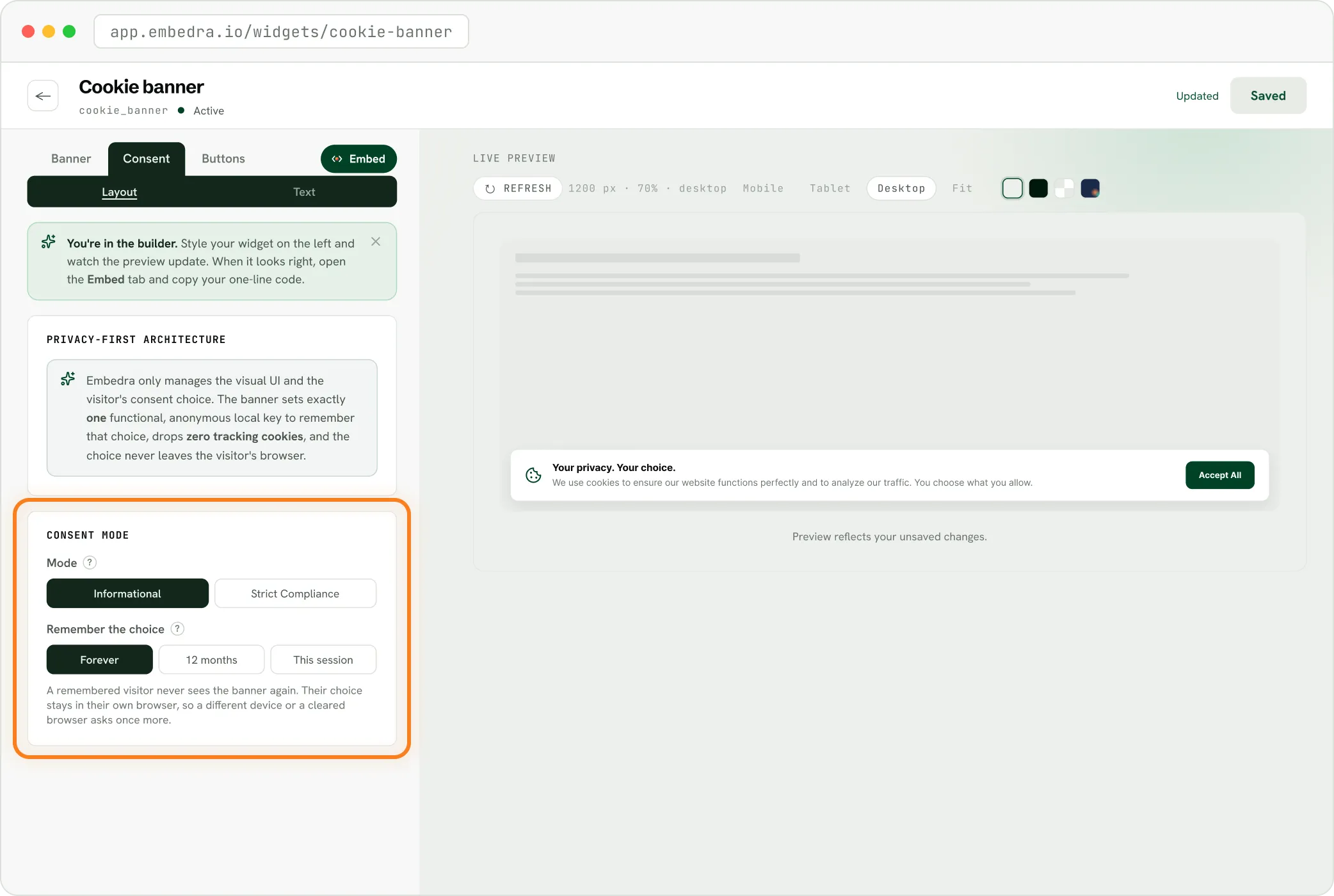
The Embedra builder's Consent panel, choosing Informational or Strict Compliance and how long to remember a choice
05

Paste the banner's code into Footer code

In Webflow: the Webflow logo, Site settings, Custom code, Footer code, then Save changes. Footer code runs on every page.

06

Publish

Webflow runs no custom code in the Designer, so open your live site or your .webflow.io address to see the banner.
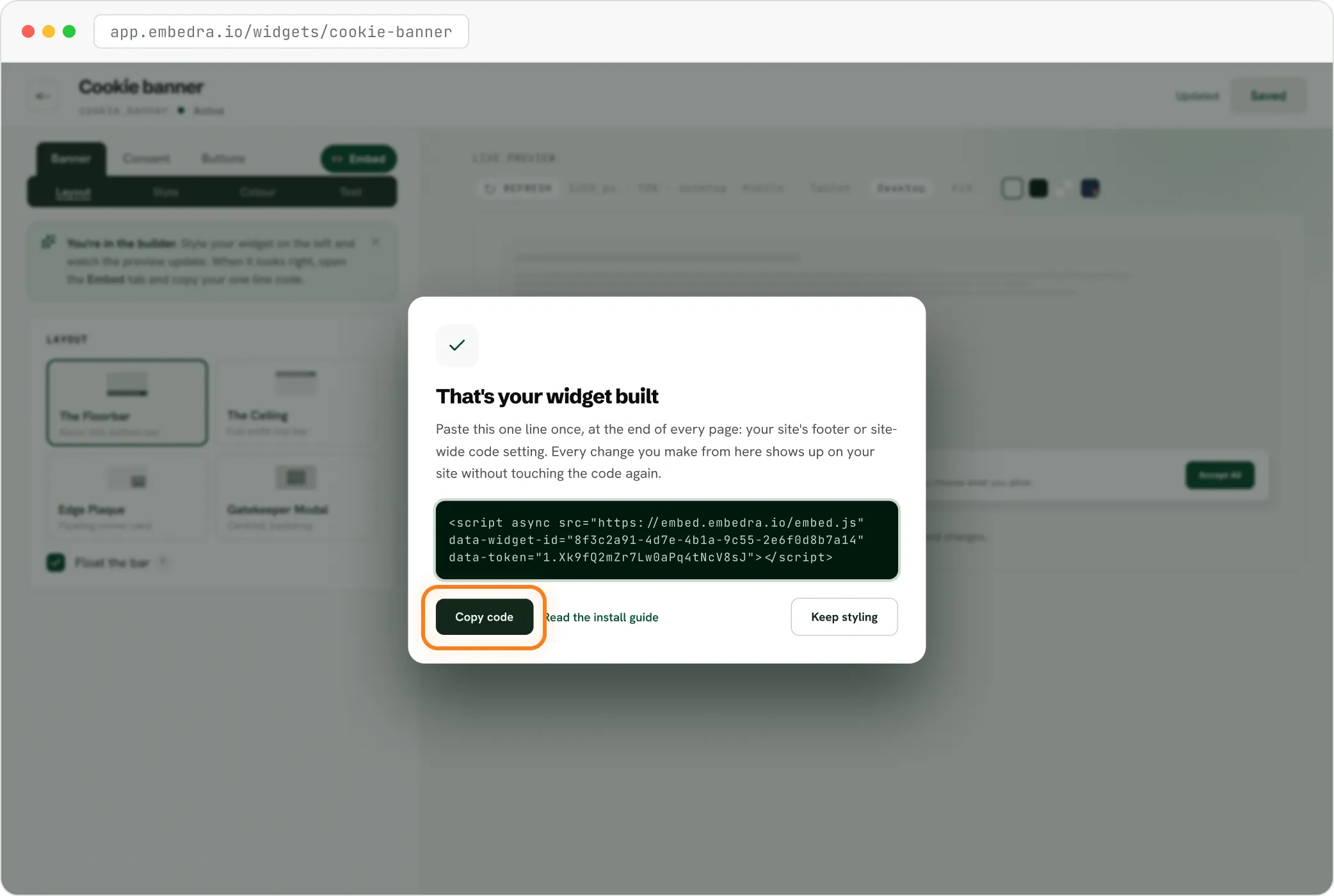
The Embedra builder after saving a cookie banner, with the one line of code ready to copy

Prefer the Designer? "Copy for Webflow" in Embedra copies the banner as a Code Embed: paste it inside a component that is on every page, like your footer. The same plan rule applies to Code Embed.

Does it keep the Meta Pixel off until a visitor says yes?

Yes, for the Pixel you connect. Paste your Pixel ID into the banner and remove the old Pixel code, and the banner loads the Pixel only once a visitor allows Marketing. Before that, nothing reaches Meta. A visitor who allows only Analytics never gets the Pixel.

Meta ads and the cookie notice →
01

Already on my site

If an app adds the Pixel and you would rather keep it, choose "Already on my site" and paste the banner's head code at the very top of Head code, above the Pixel. The Pixel then waits for the visitor's answer.

02

Running Meta ads?

Meta's Business Tools Terms ask for a clear and prominent notice on every page where the Pixel runs. The banner shows on every page with a link to your privacy policy.

Does it work with Google Consent Mode v2?

Yes. All four signals (analytics_storage, ad_storage, ad_user_data and ad_personalization) start at denied and follow the visitor's choice. You pick how, per tool.

How Consent Mode v2 works with it →
Google AnalyticsGoogle AdsTag Manager

Basic: Embedra loads it

Paste your G-, AW- or GTM- ID and remove the old tag. Google's tag loads only after a yes, with Consent Mode already set.

Consent Mode v2

Advanced: already on my site

Keep your Google tag and paste the head code above it, at the top of Webflow's Head code. Google's tags load with every signal denied and update on the choice.

Webflow's own Google Analytics field has no consent setting, so for basic mode, move the G- ID from there into the banner.

Can visitors change their mind?

Yes. Set any Webflow link's URL to #embedra-cookie-settings (a "Cookie settings" link in your footer is the usual place) and it reopens the banner with the visitor's current choice. Or switch on the banner's own Cookie settings button. Turning something off reloads the page once so the tools stop.

What it does, and what it does not

✓

Asks first

Hold Google Analytics, Google Ads, Tag Manager, Microsoft Clarity, the Meta Pixel, the TikTok Pixel, the LinkedIn Insight Tag and the ChatGPT Ads pixel until a yes.

✓

Consent Mode v2

Send Google Consent Mode v2, basic or advanced.

✓

Two categories

Keep Analytics and Marketing apart, so an Analytics-only yes never runs your ads.

✓

Change of mind

Let visitors reopen it from a Cookie settings link or button.

✓

No cookies of its own

Set no cookies of its own, and send nothing to Embedra.

✕

No site scanner

Scan your Webflow site or block scripts you did not connect. Anything else can wait for a yes if you wrap it in the banner's browser event.

✕

Webflow Analyze and Optimize

Pass the choice to Webflow Analyze or Optimize. If you use those, Webflow's consent settings for them still apply.

✕

No central consent log

Keep a central record of each choice. The answer stays in the visitor's browser.

✕

Not on a free Starter site

Work on a free Webflow Starter site, which cannot run custom code.

✕

Not the whole law

Make your site compliant with POPIA, GDPR or any other law on its own.

What happens on the free plan when the views run out?

Free covers 500 views a month: a view each time the banner loads, with a visitor counted once every 30 minutes. Past 500 the banner keeps working, until it reaches twice that or 7 days have passed, and then it pauses. A paused banner shows nothing and loads nothing: tools Embedra loads stay off, and tools held by the head code stay held. It never switches tracking on without asking. The one exception is a Clarity app with no head code, which records again. You get an email when it reaches 500, and Starter, at $7 a month, gives 15,000 views with no badge.

Free

$0 forever

500 monthly views

1 widget

1 domain

Small Embedra badge

Starter

$7/mo

15,000 monthly views

Any 3 widgets

Unlimited domains

Filter what appears

No badge

Pro

Most popular

$16/mo

75,000 monthly views

Any 10 widgets

Unlimited domains

Custom CSS / JS

5 projects

No badge

Business

$34/mo

300,000 monthly views

Everything in Pro

Unlimited widgets

1/2 overage rate

15 projects

No badge

Free

$0 forever

500 monthly views

1 widget

1 domain

Small Embedra badge

Starter

$7/mo

15,000 monthly views

Any 3 widgets

Unlimited domains

Filter what appears

No badge

Pro

Most popular

$16/mo

75,000 monthly views

Any 10 widgets

Unlimited domains

Custom CSS / JS

5 projects

No badge

Business

$34/mo

300,000 monthly views

Everything in Pro

Unlimited widgets

1/2 overage rate

15 projects

No badge

Other options for Webflow

We would rather you pick the right tool. Each of these is the better choice in some cases.

01

Consent Pro (formerly Finsweet Cookie Consent)

A Webflow app; Webflow's help names it. Free on .webflow.io staging; a paid plan for your own domain: $12 a month, or $199 once, per site. The better pick when you want it built in the Webflow canvas, an automatic site scan, automatic script blocking, consent records, or Webflow Analyze and Optimize handled.

Consent Pro pricing →
02

CookieYes

A consent platform you paste into Webflow's Head code. Free: 5,000 pageviews a month, with CookieYes branding; Basic $10 a month or $100 a year, per domain. The better pick when you need more free traffic, a cookie scan, automatic blocking or a consent log.

CookieYes pricing →
03

DataGrail

A consent platform Webflow's help names. Free plan: not checked. The better pick when you already use DataGrail.

Webflow's consent help →
04

Build your own

Webflow's tutorial: a designed banner, interactions and a footer script. Free, on a plan with custom code. The better pick when you only run the Meta Pixel and want full control.

Webflow's tutorial →

Checked on 5 November 2026 on each company's own site. Prices change; tell us if one has: support@embedra.io

Does Webflow have a built-in cookie banner?

No. Webflow's consent tools cover only its own Analyze and Optimize products. For a banner it points to Marketplace apps, an existing consent platform or custom code.

Do I need a paid Webflow plan for a cookie banner?

For any banner added with code, yes: Webflow allows custom code and Code Embed only with an active Site plan or a Core, Growth, Agency or Freelancer Workspace.

Is Embedra's cookie banner free?

Yes, on the Free plan: one banner and 500 views a month, every tracking tool and Consent Mode v2 included, with a small Embedra badge. Paid plans start at $7 a month and remove the badge.

Does it block the Meta Pixel before consent?

The Pixel you connect, yes: it loads only after a visitor allows Marketing. It does not scan for other copies, so remove the Pixel from Webflow's Apps & Integrations and your custom code.

Where do I paste the code in Webflow?

Site settings, Custom code, Footer code, then publish. Or use "Copy for Webflow" and paste the Code Embed into your footer component.

How do visitors change their cookie choice?

Add a link with the URL #embedra-cookie-settings, or switch on the banner's Cookie settings button. Either reopens the banner.

A cookie banner Webflow does not ship.

Webflow has no cookie banner of its own, so you add one. Free to start.

Design your banner